Google Local Services Ads Cost in 2026: Real Cost Per Booked Job
Google Local Services Ads cost in 2026: how pay-per-lead pricing, the Google Verified badge, ranking and lead credits work, plus your real cost per booked job.

Key takeaways
- 01 Google Local Services Ads charge per lead, not per click. A lead is a call, message or booking through your ad, and that includes voicemails and return calls that meet Google's minimum call duration.
- 02 Google Guaranteed and Google Screened are gone. Since October 20, 2025, every eligible advertiser carries one Google Verified badge, and the Money Back Guarantee has been discontinued.
- 03 In August 2026 Google began moving Local Services Ads into Google Ads as Performance Max campaigns with pay-per-lead goals: daily budgets, Smart Bidding only, and no manual cost-per-lead bids.
- 04 Cost per lead is the sticker price. Cost per booked job is the real price: divide your cost per lead by the share of leads that are real jobs, then by your close rate.
- 05 LSA rents you a spot in a lineup of competitors. Otomizer Local gives one company per trade per county the recommendation inside the neighbor thread, with no per-lead fee.
The short answer: Google Local Services Ads cost is charged per lead, not per click. You pay each time a homeowner calls, messages or books through your ad, at a price set by auction. Agency data for mid-2026 puts averages near $66 a lead for plumbing and $107 for roofing. The number that decides profit is your cost per booked job.
This guide covers how Local Services Ads (LSA) work in late 2026, after two big changes most contractors missed: Google Guaranteed became Google Verified, and LSA started moving into Google Ads as a Performance Max campaign. You get what counts as a chargeable lead, how verification and ranking work, how lead credits work now that disputes are gone, and a calculator for your real cost per booked job.
Then we put LSA next to Google Search Ads, Angi and Thumbtack, and Otomizer Local, so you can decide where your next marketing dollar goes.
What are Google Local Services Ads?
Google Local Services Ads are pay-per-lead ads that show verified local service businesses at the top of Google Search and in Google Maps. Instead of paying when someone clicks, you pay when a customer contacts you through the ad by phone, message or booking.
Three things make LSA different from regular Google Ads:
- You pay per lead, not per click. Google’s own description is blunt: you’re charged only when a potential customer contacts your business directly through your ad.
- There are no keywords. You pick your service categories, job types and service area. Google decides which searches you show for.
- You have to be verified first. Every advertiser goes through business registration, identity, and (in most trades) background, license and insurance checks before ads run.
That combination is why LSA feels attractive. No wasted clicks, a trust badge next to your name, and calls that start within days. The cost shows up later, in the math between the call and the invoice.
What changed with Local Services Ads in 2025 and 2026?
If your picture of LSA comes from a few years ago, three things are out of date.
1. Google Guaranteed and Google Screened are retired. On October 20, 2025, Google replaced Google Guaranteed, Google Screened and License Verified by Google with a single Google Verified badge. Google’s announcement names the Money Back Guarantee among the programs the new badge replaces, and Search Engine Roundtable quoted Google confirming the guarantee was discontinued.
2. Manual lead disputes are gone. In July 2024, Google moved every advertiser to automated lead crediting. You no longer argue a bad lead. Google’s system decides.
3. LSA is moving into Google Ads. Starting August 2026, Google began migrating Local Services Ads to Performance Max campaigns with pay-per-lead goals. The first phase covers US home and storefront services such as plumbing, HVAC, electrical, appliance repair, house cleaning, lawn care, roofing, pest control and moving. Service-area businesses without storefronts follow in late 2026, and non-US accounts in 2027.
Here is what the migration changes and what it keeps, per Google’s own help page:
| Classic LSA dashboard | LSA in Google Ads (Performance Max, pay-per-lead goal) | |
|---|---|---|
| How you pay | Per valid lead | Per valid lead (unchanged) |
| Where ads show | Google Search and Maps | Google Search and Maps, same positions |
| Budget | Average weekly budget | Daily average (weekly divided by 7), monthly cap of daily times 30.4 |
| Bidding | Maximize leads, target cost per lead, or manual max per lead | Smart Bidding only. Manual max per lead is no longer supported |
| Per-category bids | Vertical-level targets | One campaign-level target. Separate rules need separate campaigns |
| Business details | Edited in the LSA profile | Synced one way from your Google Business Profile |
| Badge | Google Verified | Google Verified carries over automatically |
| Old reports | In the dashboard | Historical performance reports do not transfer |
The direction is clear. Every release hands more of the controls to Google’s automation and leaves you with two levers: your budget and how fast you answer the phone.
How do Google Local Services Ads work, step by step?
Here is the full path from sign-up to a charged lead.
- Get verified. Prove your business registration, confirm you manage your Google Business Profile, pass the identity check, and clear the background, license and insurance checks your trade requires.
- Set categories, job types and service area. This replaces keywords. Google’s best-practice guide suggests targeting broadly, such as a whole county, while staying within about two hours’ drive.
- Set a budget. Google spends it across the week (or day, after migration) as demand allows. Smart Bidding sets the price of each lead.
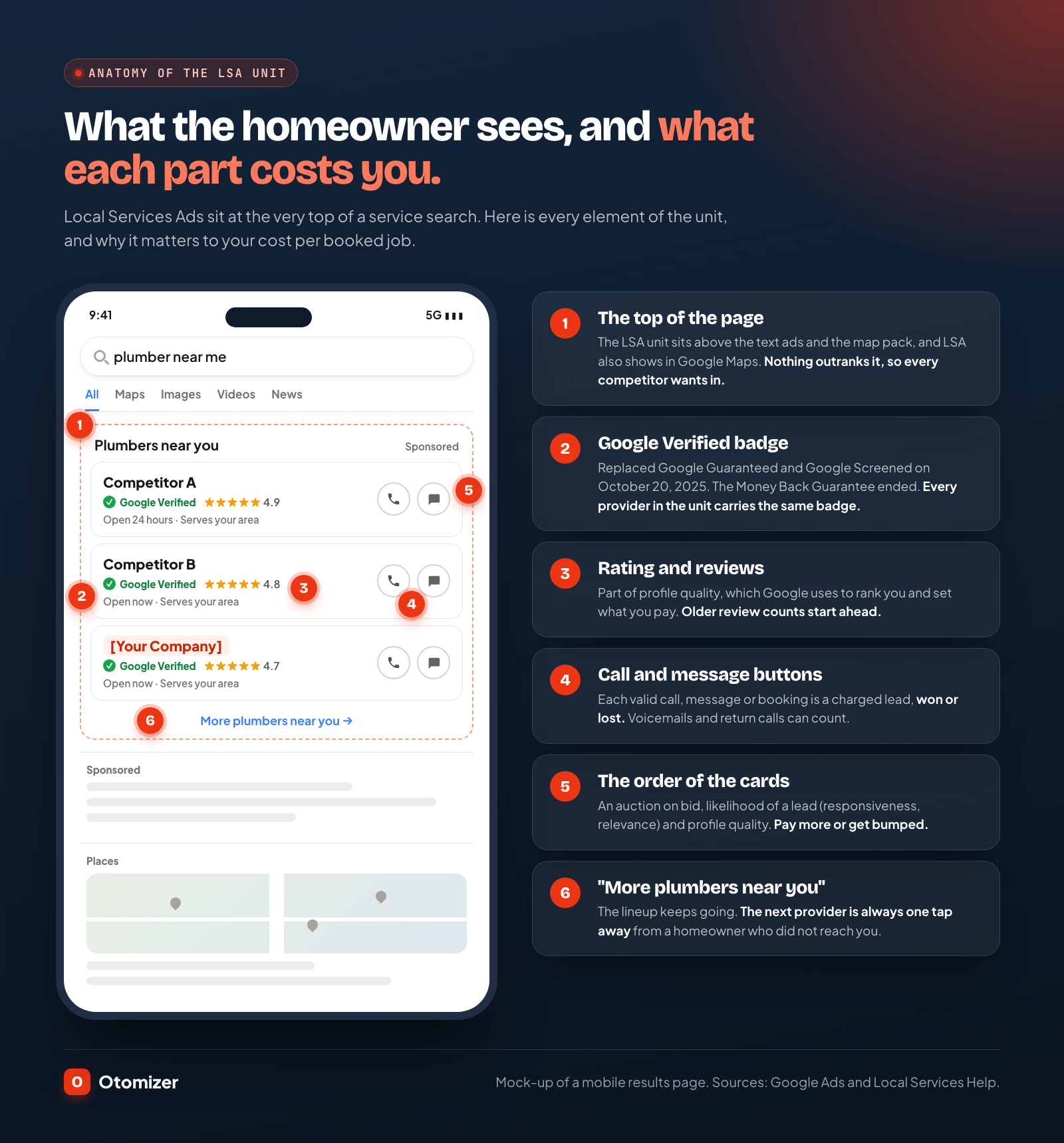
- Show up in the ad unit. When a homeowner searches something like “plumber near me,” eligible providers appear in an auction-ranked row at the top of Search and in Maps.
- Get contacted. The homeowner taps to call, sends a message, or books an appointment. Each of those is a lead.
- Get charged. If the contact passes Google’s validity checks at first contact, you pay for it, whether or not you win the job.
- Maybe get credited. Google reassesses charged leads and may credit low-quality ones automatically, usually within 30 days.
Steps 6 and 7 are where contractors lose money without noticing. The rest of this guide spends most of its time there.
Google Guaranteed vs Google Screened vs Google Verified: what’s the difference?
People still search for “Google Guaranteed” and “Google Screened,” so here is how the badges map.
Google Guaranteed was the badge for home service trades: plumbers, HVAC companies, roofers, electricians, cleaners and similar. It came with a Google-backed money-back guarantee for customers who were unhappy with the work.
Google Screened was the badge for professional services, such as lawyers, financial planners and real estate agents. It showed the business passed screening, without a guarantee attached.
License Verified by Google covered health care providers.
Google Verified is the single badge that replaced all three on October 20, 2025. It tells a searcher the business completed Google’s screening and verification checks. It no longer promises a refund.
What this means for you: the badge still signals trust, but every competitor in the ad unit carries the same badge. It is a ticket to stand in the lineup, not a reason to be picked from it. The homeowner still decides on stars, review count, and who answers first.
How does Google verify businesses for Local Services Ads?
Google’s screening and verification process varies by trade and location. For a US home service contractor, expect these checks:
- Business registration. Usually a D-U-N-S number. If you cannot get one, a state registration, EIN or state revenue department registration can work. A new D-U-N-S number can take up to 30 days.
- Google Business Profile. You prove you own or manage the profile that matches your ad.
- Representative identity check. The person setting up the account is confirmed as affiliated with the business, and an identity check runs against a government-issued photo ID.
- Background checks. In some categories, Google’s background check partners screen the business, its owners, and the service professionals who do the core work. Google states businesses are not charged for the background check.
- License and insurance. Required for some categories and locations. Most trades need general liability insurance, and many need a state license.
Eligible advertisers have 14 days to finish additional verification steps to keep ads running. If a background check disqualifies you, the wait to reapply is 30 days after the first denial and 180 days after a second.
One welcome change for migrated accounts: Google says insurance and license reverification is no longer required, though business-level checks can still be requested through a notification in Google Ads.
How much do Google Local Services Ads cost?
There is no fixed price. Each lead is priced in an auction, so your cost depends on your trade, your market, how many competitors bid, and the quality of your profile.
Google does not publish cost-per-lead figures. The most current public benchmark we found is from 99 Calls, an LSA management agency, which published average cost per lead by category from its own managed accounts for April to June 2026:
| Trade (LSA category) | Avg. cost per lead, Apr to Jun 2025 | Avg. cost per lead, Apr to Jun 2026 | Change |
|---|---|---|---|
| Electrical | $28.58 | $43.15 | +51% |
| Handyman | $25.06 | $38.51 | +54% |
| Landscaping | $22.67 | $37.29 | +64% |
| Tree services | $33.93 | $37.77 | +11% |
| Plumbing | $70.06 | $66.17 | -6% |
| Roofing | $73.62 | $106.87 | +45% |
| Water damage | $171.64 | $215.31 | +25% |
Two things stand out. Most categories got more expensive in a single year, several by half or more. And high-ticket, urgent work like roofing and water damage costs the most per contact, because every restoration company in the market wants that call.
How much budget does LSA need?
Google’s bidding guide for Local Services Ads recommends a budget that covers at least 10 leads per week, and says the system takes about two weeks to learn. Run that against the plumbing benchmark:
- 10 leads a week × $66 = $660 a week
- $660 × 52 weeks ÷ 12 months = about $2,860 a month
For roofing at $107 a lead, the same rule lands near $4,640 a month. That is before a single job is booked, and it scales up every time you want more volume.
After migration, Google converts your weekly budget into a daily average (weekly divided by 7) and caps monthly spend at the daily average times 30.4. Busy days can spend more than the daily figure. Google’s best-practice page says daily spend fluctuating with demand is expected.
Which bidding mode should you use?
Classic LSA offered three modes: Maximize leads (Google sets bids), target cost per lead, and manual max per lead. In the Performance Max version, manual bidding is gone. Google’s best practices recommend keeping the default Maximize Conversions strategy and only setting a target cost per lead once you get more than 15 leads a month, since a target can limit delivery and lead volume.
In plain terms: you set a budget, and Google decides what each lead costs you.
What counts as a chargeable lead?
A lead is any contact a customer makes directly through your ad. Google lists three lead types:
- Phone calls (required). Google tracks answered calls, voicemails, and return calls to missed connections. You are charged for calls that meet minimum call duration requirements.
- Messages (optional). Charged when a customer sends a text or email through the ad.
- Bookings (optional, from October 2026). Charged when a customer schedules an appointment through the ad.
Read the phone line twice. A voicemail can be a charged lead. A homeowner who called while your tech was under a sink, then got a callback from you, can be a charged lead. You pay for the contact, not the outcome.
What you are not charged for
Google assesses each lead at first contact, and leads it judges invalid or low quality, such as duplicates, are not charged. Google also offers Direct Business Search, which can screen out returning customers searching your business name so you pay only for new ones.
How lead credits work now
Google’s automated lead credit policy works like this:
- Leads are assessed when the customer first makes contact. Invalid ones are not charged.
- Charged leads are reassessed over time and may be credited automatically if Google later judges them low quality.
- Credits usually land in your account balance within 30 days, while the original charge stays on your invoice.
- Google no longer credits “job type not serviced” or “geo not serviced” leads.
Point 4 is the one that stings. A homeowner two counties over, or asking for a job you do not do, is your problem now. The only defense is tight categories, job types and service area, plus answering the Lead Feedback Survey so the system learns. There is no button to argue the charge.
What does a Google Local Services Ads lead really cost per booked job?
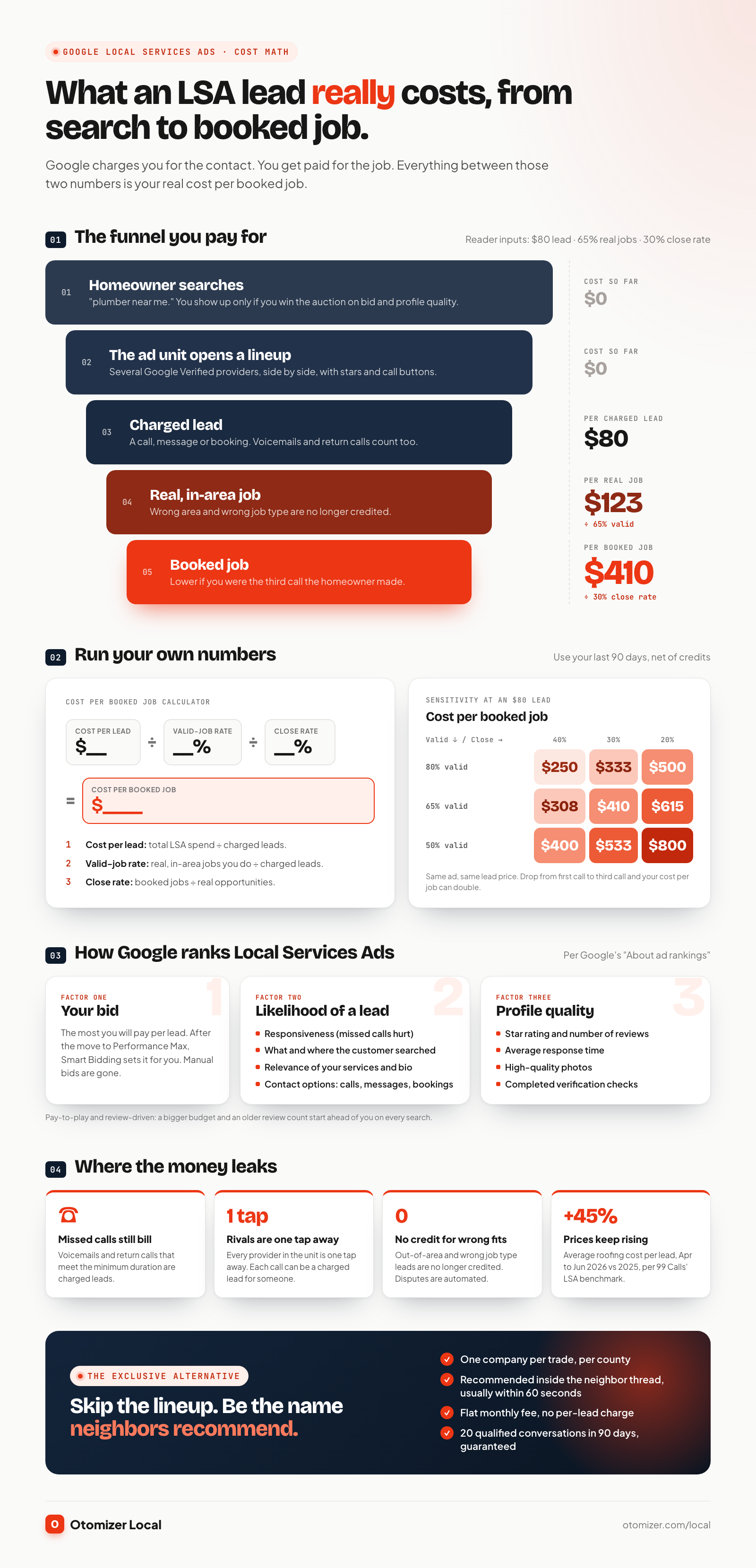
Cost per lead is the sticker price. Cost per booked job is what you actually pay to put a truck in a driveway. Here is the formula:
Cost per booked job = cost per lead ÷ valid-job rate ÷ close rate
- Cost per lead: your total LSA spend divided by charged leads.
- Valid-job rate: the share of charged leads that are a real job you do, in your area, from someone ready to hire. Wrong numbers, out-of-area callers, price shoppers and job types you do not handle all fall out here.
- Close rate: the share of valid opportunities that become booked jobs.
Worked example: plumbing
Say you pay $80 per charged lead, 65% of charged leads are real in-area jobs, and you close 30% of those.
- $80 ÷ 0.65 = $123 per real opportunity
- $123 ÷ 0.30 = $410 per booked job
The $80 lead is a $410 job. Now change one input. If you are the third plumber the homeowner calls and your close rate drops to 20%, the same lead costs $615 per booked job. Nothing about your ad changed. The lineup did.
Worked example: roofing
At $107 per lead, a 60% valid-job rate and a 20% close rate on replacements:
- $107 ÷ 0.60 = $178 per real opportunity
- $178 ÷ 0.20 = about $892 per signed roof
Your own numbers
Pull the last 90 days from your account and your CRM, then fill this in:
| Input | Where to find it | Your number |
|---|---|---|
| Total LSA spend | Google Ads billing, net of credits | $ |
| Charged leads | Leads page | |
| Cost per lead | Spend ÷ charged leads | $ |
| Valid-job rate | Leads that were real, in-area jobs ÷ charged leads | % |
| Close rate | Booked jobs ÷ real opportunities | % |
| Cost per booked job | Cost per lead ÷ valid-job rate ÷ close rate | $ |
| Average gross profit per job | Your job costing | $ |
If cost per booked job eats more than a third of your gross profit per job, LSA is renting you revenue at a margin you would never accept from a subcontractor.
How does Google rank Local Services Ads?
Google ranks LSA providers through an auction. Its ad ranking page lists three groups of factors:
- Your bid. The most you are willing to pay for a lead.
- Likelihood of a lead, based on:
- Responsiveness to customer inquiries. Missed calls can hurt it.
- What the customer is searching for, including service, time and location.
- Relevance of your services and business bio to the search.
- Available contact options. Turning on messages or bookings gives customers more ways to reach you.
- Profile quality: your rating, number of reviews, average response time, high-quality images, completed verification checks and other business information. Google says higher-quality profiles may rank higher and pay lower costs per lead.
Google’s best-practice guide adds the practical version: keep at least five Google Business Profile reviews and a rating above four stars, answer calls promptly during your ad hours, and return missed calls right away. Location matters through your service area and the searcher’s location, and if a business has several locations serving the same area, Google shows only the highest-ranked one.
What that means in practice
- It is pay-to-play. Bid is factor number one. A competitor willing to pay more per lead starts ahead.
- Reviews compound for incumbents. The company with years of reviews ranks higher, which earns more calls, which earns more reviews. A newer company pays more to climb.
- Responsiveness is policed. Miss calls during a busy week and your ranking drops exactly when you most need it to hold.
Where do Local Services Ads appear in Google Search and Maps?
LSA shows in the most valuable spot on the page: a dedicated ad unit at the top of Google Search results for service searches, above the regular text ads and the map pack, plus placements in Google Maps. Migrated campaigns keep the same placements and never run on YouTube, Gmail or display sites.
Each provider card shows the business name, the Google Verified badge, star rating and review count, and often years in business, service area and hours. Below the first providers sits a link to see more, which opens a full list of competitors in the same category.
That layout is the problem in one picture. The homeowner is looking at several verified companies, side by side, with stars and phone buttons. Nothing stops them from calling the first three. Every one of those calls can be a charged lead for a different contractor.
Are Google Local Services Ads worth it?
LSA is fast and the leads have intent. It also has structural limits no amount of optimization fixes.
You pay for the contact, not the job
Every valid call, message and booking is charged, including voicemails and callbacks. Losing the job does not refund the lead. Your cost scales with how many people contact you, not with how much work you book.
The homeowner shops the lineup
The ad unit is built for comparison. Several verified providers, same badge, stars on display. When a water heater fails, homeowners call down the list until someone answers and quotes a time. A lead is only as exclusive as the homeowner’s patience.
Ranking rewards the biggest budget and the oldest review count
Bid is the first ranking factor, and review volume rewards whoever has been advertising longest. A newer or smaller company pays more to be seen, then competes against incumbents for every call.
Prices keep climbing
In the 99 Calls benchmark, most categories rose year over year, electrical by 51% and roofing by 45%. Every new competitor in your area raises the clearing price of your next lead.
Disputes are automated and narrowed
You no longer contest a bad lead. Google decides what to credit, and out-of-area or wrong-job-type leads are no longer creditable at all.
The controls keep shrinking
Manual bids are gone in the Performance Max version. One campaign-level target replaces per-category bids. Old reports do not carry over. You set a budget and trust the system.
You rent the spot
Stop paying and you vanish from the ad unit the same day. Nothing you spent builds an asset you own.
Contractors stay on LSA because the phone rings. The better question is whether the same dollars buy more booked jobs somewhere the homeowner is not comparing you to four other companies.
Local Services Ads vs Google Search Ads vs Angi and Thumbtack vs Otomizer Local
Here is how the main paid options compare for a home service contractor.
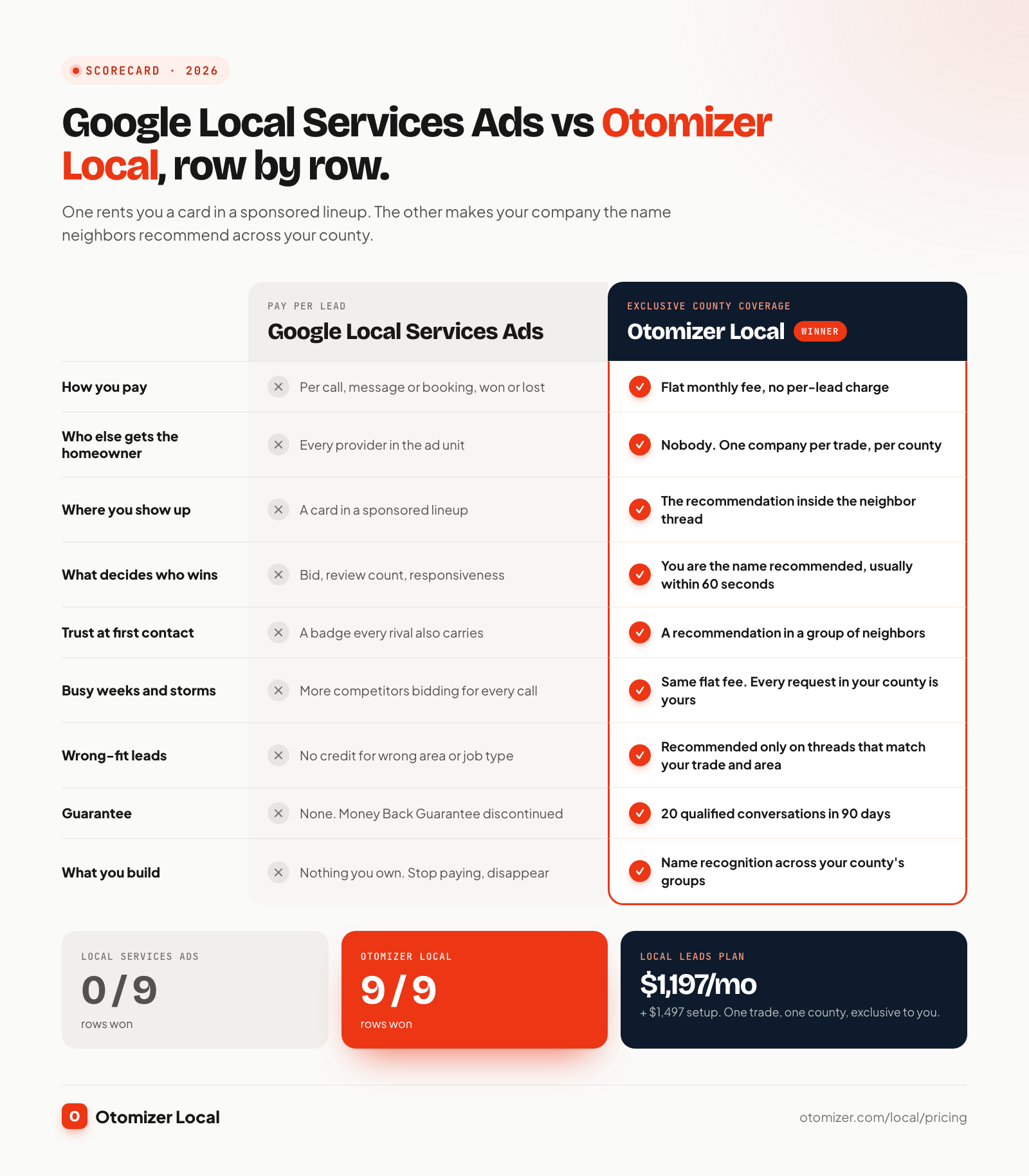
| Google Local Services Ads | Google Search Ads | Angi / Thumbtack | Otomizer Local | |
|---|---|---|---|---|
| How you pay | Per call, message or booking | Per click | Per lead or per contact | Flat monthly fee, no per-lead charge |
| Who else gets the homeowner | Every provider in the ad unit | Every advertiser and map listing on the page | Several pros sold the same request | Nobody. One company per trade per county |
| Where you show up | Top of Search and Maps, next to rivals | Ad slots above and below results | Inside the marketplace app | Inside the neighbor thread, as the recommendation |
| What decides who wins | Bid, reviews, responsiveness | Bid, Quality Score, landing page | Speed and price | Your name is the one recommended, usually inside 60 seconds |
| Trust at first contact | A badge every rival also carries | An ad label | A marketplace profile | A recommendation in a group of neighbors |
| Busy weeks and storms | Prices and competition spike | Click costs spike | More contractors per lead | Same flat fee, every request in your county is yours |
| Bad or wrong leads | Automated credits only, no credit for wrong area or job type | You pay for every click | Credit policies vary by platform | You are only recommended on threads that match your trade and area |
| Guarantee | None. Money Back Guarantee discontinued | None | None | 20 qualified conversations in 90 days, or we keep working free |
| What you build | Nothing. Stop paying, disappear | Nothing | Nothing | Name recognition across your county’s groups |
For deeper head-to-heads, see Otomizer Local vs Angi leads, Otomizer Local vs Thumbtack, and our breakdown of whether Angi leads are worth it.
How do you lower your Local Services Ads cost per booked job?
If you are running LSA today, these steps cut waste while you build an exclusive channel to replace it.
- Answer every call live during your ad hours. Responsiveness is a ranking factor and missed calls are still charged when they meet the minimum duration. If nobody can pick up, shrink the ad schedule.
- Match your ad schedule to staffed hours. A lead at 9 p.m. that rolls to voicemail costs the same and books less.
- Trim categories and job types to the work you want. Wrong-job-type leads are no longer credited. Remove anything you would turn down.
- Set your service area to where you will actually drive. Wrong-area leads are no longer credited either.
- Turn on Direct Business Search so returning customers searching your name are screened out.
- Only enable messages and bookings if you reply within the hour. Google’s guide says message leads typically cost less than phone leads, but a slow reply is a paid lead handed to the next provider.
- Answer the Lead Feedback Survey on every lead. It is the only input you have into what Google credits and sends you.
- Ask every closed job for a Google review. Rating and review count feed profile quality, which can lower your cost per lead.
- Keep Maximize Conversions until you pass 15 leads a month. Google says a target cost per lead set too early limits delivery.
- Calculate cost per booked job every month, net of credits, and compare it with what an exclusive channel costs.
Step 10 is where most contractors make the move. Once you see a $400 to $900 acquisition cost per job on paper, a flat-fee channel with no lineup looks very different.
Why is exclusive county coverage the better primary engine?
LSA puts you in front of a homeowner who is already comparing. Otomizer Local puts you in front of the homeowner before the comparison starts.
Every county has Facebook groups where homeowners ask neighbors who to hire: “Water heater just died, who do you use?” “Need a roofer who can come before the next rain.” The first credible names in that thread get the calls, and the homeowner trusts them because a neighbor said so.
Here is how Otomizer Local wins those threads for you:
- One company per trade, per county. Once you hold plumbing in your county, we never recommend a competitor in your groups at any price. Every matching request in your territory is yours.
- Every group, private ones included. Our aged local accounts are members of the groups in your county, so we see the threads your competitors never do.
- Around the clock. Monitoring runs 24/7, nights and weekends, and a recommendation naming your company goes up usually inside 60 seconds.
- No per-lead fee. Busy week, storm week, slow week: the price stays flat. Ten more requests this month cost you nothing extra.
- A text the moment a homeowner responds, plus a dashboard of every thread, a named account manager and a weekly summary.
- A guarantee LSA does not offer: 20 qualified conversations in your first 90 days, or we keep working at no charge until you get them.
What it costs
From our pricing page:
| Plan | Monthly | Setup | What it adds |
|---|---|---|---|
| Local Leads | $1,197 | $1,497 | Exclusive county coverage, 24/7 recommendations, alerts, dashboard, account manager |
| Local Presence | $1,497 | $1,797 | Brand kit, 20 designed posts and 4 short videos a month across groups, Facebook, Instagram and Google Business Profile, seasonal campaigns, review requests to every closed job |
| Local Dominance | $1,997 | $2,997 | Premium website rebuild, local SEO, AI search (AEO) and a monthly visibility report |
Compare that with Google’s own LSA budget guidance. Ten plumbing leads a week at the 2026 benchmark is about $2,860 a month, more than Local Dominance, and every one of those leads is shared with the rest of the ad unit. Local Leads at $1,197 a month is a fixed number that does not rise when demand does.
Local Presence also sends review requests to every closed job, which keeps your Google rating climbing on its own. Local Dominance adds the website, local SEO and AI search work that make you the name homeowners find when they look you up after the recommendation.
Built for the trades LSA charges most for
The trades with the highest LSA prices are the ones where neighbor recommendations carry the most weight: urgent, high-ticket, trust-heavy work. See how coverage works for roofing, plumbing, HVAC, electrical and restoration, or check how many requests your county produces in the demand report.
A 30-day plan to move off pay-per-lead
- Week 1: get your real number. Export 90 days of LSA leads and spend, tag outcomes, and calculate cost per booked job with the table above.
- Week 1: claim your county. Apply for your territory before another company in your trade holds it. We hand-check your county and send real numbers within 24 hours, before anything is charged.
- Weeks 2 to 3: go live. We map and join your county’s groups and start recommending your company in matching threads. See how it works for the full onboarding.
- Week 4: compare. Put Otomizer Local conversations and booked jobs next to your LSA cost per booked job.
- Then reallocate. As group conversations replace paid leads, cut LSA spend and keep the margin.
For the bigger picture on channel mix, see our home service marketing guide, plus trade playbooks on how to get HVAC leads and how to get roofing leads. Contractors leaving marketplaces should also read how to get contractor leads without Angi.
The bottom line
Google Local Services Ads cost what the auction says, every time a homeowner taps call. In 2026 that means rising prices, a badge every competitor shares, automated credits you cannot argue, and fewer controls each release. The lead you pay for is usually one of several calls the homeowner makes.
Exclusive county coverage flips that. Your company is the one recommended inside the neighbor thread, the price is flat, and nobody else in your trade gets the request. Run the cost-per-booked-job math on your last 90 days of LSA, then claim your county.

Stop racing for shared leads. Get recommended in your county.
Otomizer Local covers one trade in one county exclusively. Our team monitors neighborhood groups and posts a recommendation naming your company when homeowners ask who to hire.
Apply for Otomizer LocalOne company per trade per county · Three-month initial term
FAQ
Frequently asked questions
01How much do Google Local Services Ads cost per lead?
02Are Google Local Services Ads worth it for contractors?
03Is Google Guaranteed still available?
04What was the difference between Google Guaranteed and Google Screened?
05Can you dispute Google Local Services Ads leads?
06How does Google rank Local Services Ads?
07How do Google Local Services Ads work now that they moved to Performance Max?
08What is the best alternative to Google Local Services Ads?
Keep reading
Related articles
Are Angi Leads Worth It? A Contractor Cost Breakdown for 2026
August 26, 2026
ContractorsHow to Get Plumbing Leads in 2026: 12 Channels Ranked by Cost
November 13, 2026
ContractorsHow to Get HVAC Leads in 2026: Every Channel Ranked by Cost Per Booked Job
October 30, 2026
ContractorsHow to Get Roofing Leads in 2026 (Without Paying for Shared Leads)
October 30, 2026