How to Get More Google Reviews: 22 Templates and a 72-Hour System
How to get more Google reviews the compliant way: a 72-hour ask system, 22 copy-paste text, email and reply templates, and a weekly review KPI tracker.

Key takeaways
- 01 Google says more reviews and positive ratings can help your local ranking, and recent reviews are what customers and AI assistants read first. Review volume and recency are a growth channel, not a vanity number.
- 02 Ask every customer, every closed job, at the moment the work is done: an in-person ask from the tech, a text within two hours, one follow-up on day three, and your link on every invoice, card and email.
- 03 Never gate, incentivize, buy or swap reviews. Google removes them, and the FTC rule on consumer reviews (16 CFR Part 465, in force since October 21, 2024) allows civil penalties for buying sentiment-conditioned reviews and suppressing negative ones.
- 04 Reply to every review within a day or two. A specific, human reply to a one-star review often does more for the next customer than another five-star review.
- 05 Track ask rate, review rate, reviews in the last 90 days and response time every week. Otomizer Local Presence sends review requests to every closed job for you, and Local Dominance turns those reviews into Maps and AI visibility.
The short answer: to get more Google reviews, ask every customer at the moment the job is finished. Have the tech ask in person, text your Google review link within two hours, follow up once after three days, and put the link on every invoice and card. Never offer incentives or screen out unhappy customers. Then reply to every review.
That is the system. The rest of this guide gives you everything to run it on Monday: how to get your review link and QR code, the 72-hour sequence step by step, 15 copy-paste request templates (text, email, in person, print), 7 reply templates for five-star, three-star and one-star reviews, how to flag and appeal reviews that break the rules, what Google and the FTC prohibit, and a weekly tracker that tells you whether it is working.
It is written for contractors and local service businesses: roofers, HVAC, plumbers, electricians, cleaners, landscapers, painters and everyone else who finishes a job at a customer’s home and drives away.
Why do Google reviews matter so much for a local business?
Google reviews are written ratings customers leave on your Google Business Profile, and they show up in Google Search, Google Maps and increasingly in AI answers. They drive three things you care about.
Maps ranking. Google ranks local results on three factors: relevance, distance and prominence. In its own local ranking guidance, Google says prominence is based partly on “how many reviews you have,” and that more reviews and positive ratings can help your local ranking. You cannot move your office closer to every customer. You can grow your reviews every week. Our guide on how to rank higher on Google Maps covers the other ranking levers.
Calls. Customers read reviews before they call, and they read the recent ones. In BrightLocal’s Local Consumer Review Survey 2026, 97% of consumers say they read reviews for local businesses, 68% will only use a business with four or more stars, and 74% seek reviews written in the last three months. A profile with a great average and nothing new since spring loses the call to a profile that looks busy.
AI recommendations. The same BrightLocal survey found consumers using AI tools for local recommendations rose from 6% to 45% in a year. When ChatGPT, Gemini or a Google AI Overview names two or three local businesses, it leans on what customers say about them. Specific, recent reviews give an assistant something concrete to repeat. Our explainer on AEO for local businesses shows how that works.
| What reviews move | How it shows up | What wins it |
|---|---|---|
| Google Maps ranking | Higher placement in the map pack | Steady review volume and strong ratings |
| Calls and clicks | Customers pick you over the listing next to you | Recent reviews, a high average, replies from the owner |
| AI recommendations | ChatGPT and AI Overviews name you | Detailed reviews that describe real jobs |
| Close rate | Fewer price objections on the estimate | A profile the customer already trusts before you arrive |
Reviews are also the one marketing asset that compounds for free. A review you earn this week keeps working for years. The home service marketing guide puts reviews in the context of your whole channel mix.
When is the best time to ask for a Google review?
Ask at the moment of relief: the job is complete, the customer has seen the result, and the problem they called about is gone. The AC is blowing cold. The leak is dry. The new panel is labeled and the lights are on. That is when the experience is vivid and gratitude is highest.
Three rules for timing:
- Ask the same day. A request that arrives a week later competes with everything else in their life. A request that arrives an hour after the tech leaves lands while they are still telling their spouse about it.
- Ask every customer. Not only the ones who were chatty, not only the ones who said thank you. Google prohibits selectively soliciting positive reviews, and selective asking also starves your profile of volume.
- Finish the job first. If a part is on order or a callback is scheduled, the job is not closed yet. Send the request when the work is complete, the same way you would for anyone else.
How do you get your Google review link and QR code?
Your Google review link opens the review box for your business directly, so the customer taps once and starts typing. Google’s help page on creating a review link or QR code lays out the steps:
- On a computer, sign in and open your Business Profile.
- Select Read reviews, then Get more reviews.
- Select Copy to copy your review link.
- Right-click the QR code and choose Save image as to download it.
Two details trip people up. Google generates review QR codes only in a computer browser, not on mobile, so do this from a laptop once and save the files. And customers must be signed into a Google account to leave a review, which is why the review link works best on a phone where they already are.
Make a shortlink. The Google link is long and impossible to say out loud. Set up a redirect on your own website, like yourcompany.com/review, that points to it. Now your techs can say it, it fits on a truck magnet, and if the Google link ever changes you update one redirect instead of reprinting cards.
Save four assets in one shared folder: the Google link, your shortlink, the QR code as a PNG, and a QR code version with your logo for print.
The 72-hour review system, step by step
One ask is easy to ignore. A short sequence of well-timed touchpoints, each with the same link, is how a review habit becomes a review engine. Here is the full sequence for every closed job.
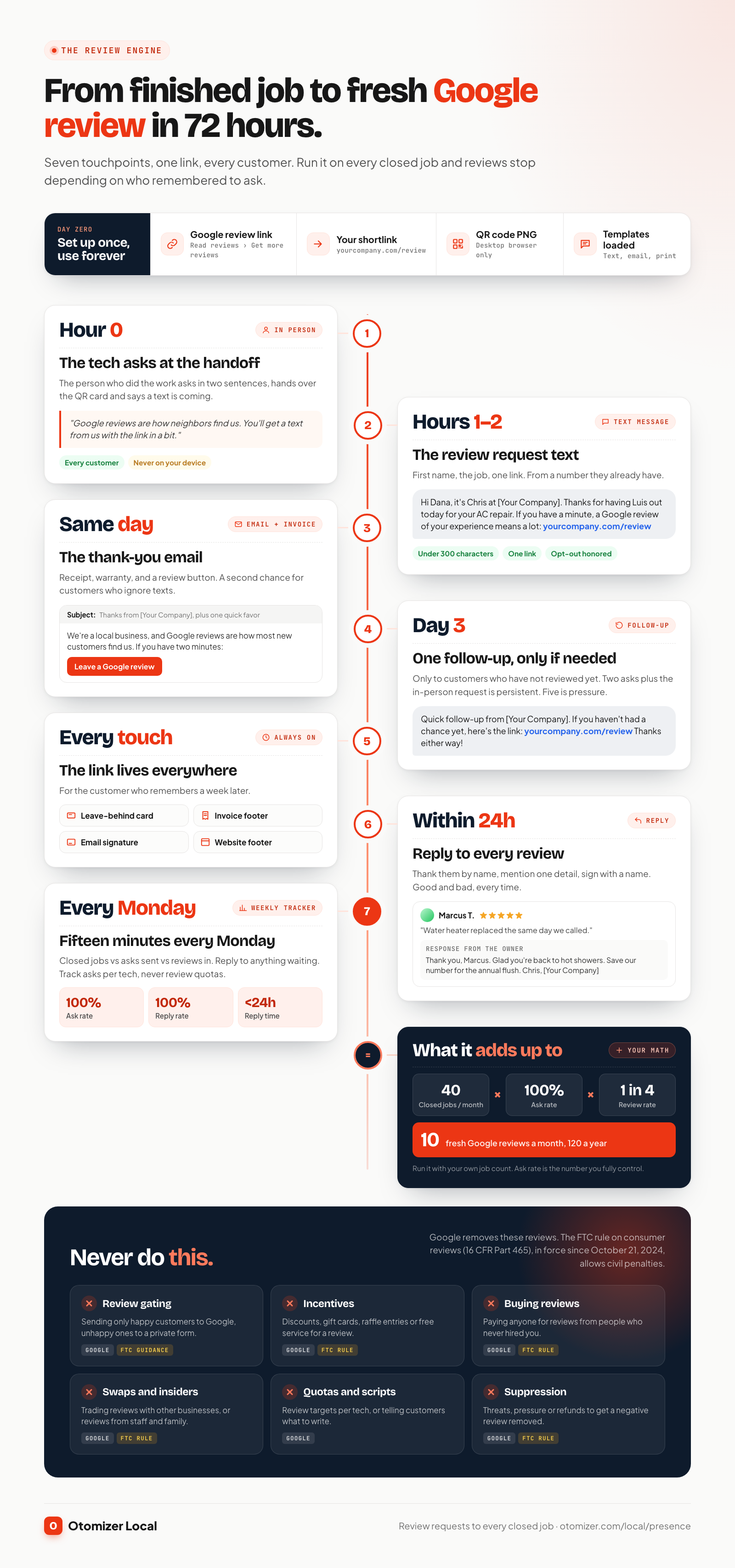
Step 1: Set up your assets once (day zero)
Copy your review link, build the shortlink, save the QR code, and load the templates below into whatever you use to text and email customers. Add the shortlink to your invoice template and email signature. This takes an afternoon and then runs forever.
Step 2: The tech asks in person (hour zero)
The person who did the work asks, at the handoff, in one or two sentences. It is the most personal ask in the sequence and it primes the customer for the text that follows. Hand them a card with the QR code, and tell them a text is coming. Do not hand over your own phone or tablet and wait while they write. Google says businesses should not require or pressure customers to leave reviews while on the premises, and a review written on your device with you watching looks exactly like that.
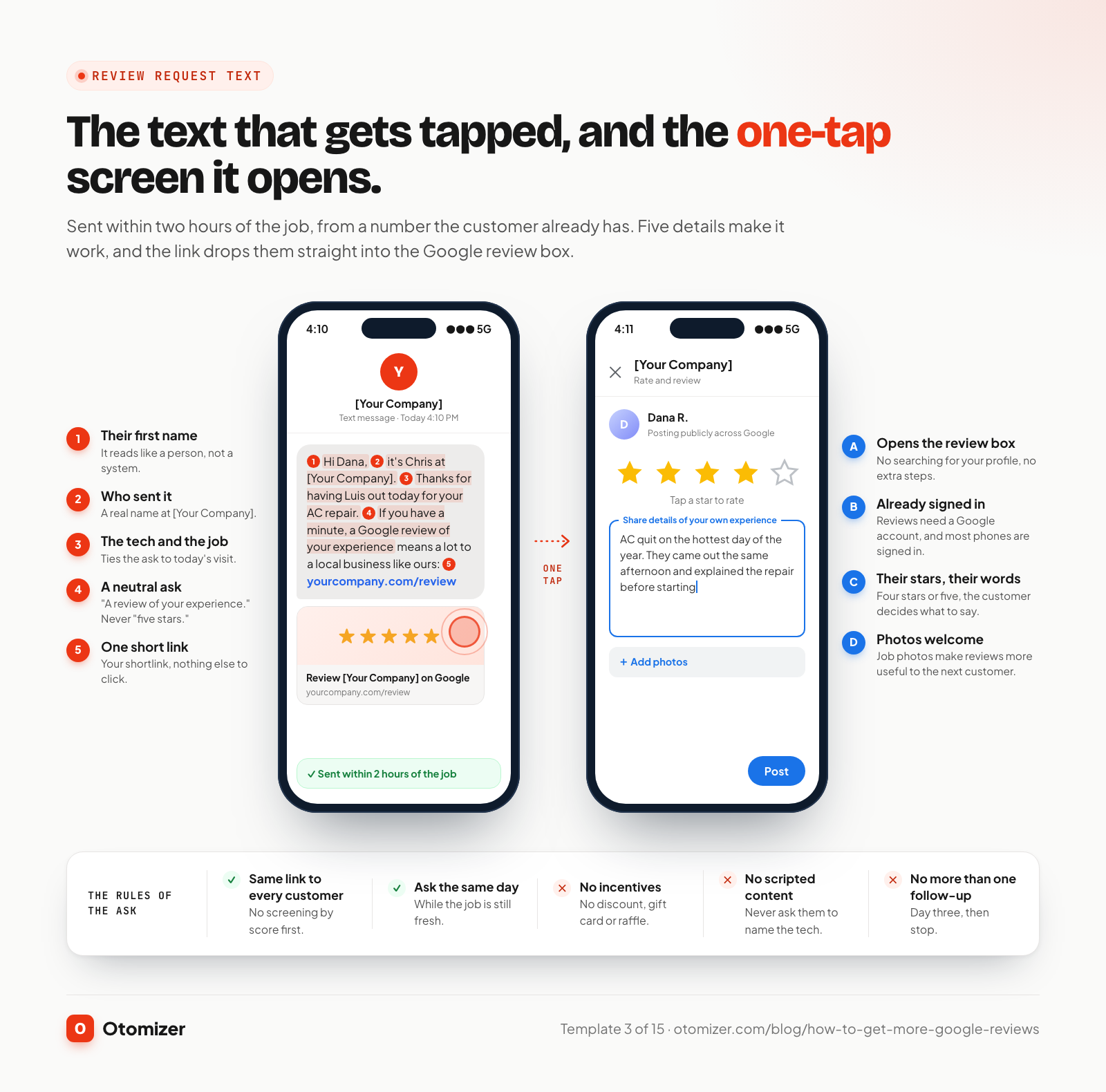
Step 3: Send the review request text (within two hours)
A text lands on the phone in their pocket, from a business they just paid. Send it from a number they recognize, include their first name and the job, and put one link in it. Text only customers who gave you their mobile number for the job, and honor any opt-out request.
Step 4: Send the email and the invoice (same day)
The email is a second chance for customers who ignore texts, and it carries the receipt they will keep. Put the review link in the body and a one-line ask at the bottom of the invoice.
Step 5: One follow-up (day three)
Send one short follow-up to anyone who has not reviewed yet. Then stop. Two asks plus the in-person request is persistent. Five asks is pressure, and pressure produces either silence or a grumpy review.
Step 6: Keep the link everywhere (always on)
The leave-behind card, the invoice footer, your email signature, your website footer and the thank-you page after an online booking all carry the shortlink and QR code. These catch the customer who remembers a week later.
Step 7: Reply to every review (within 24 hours)
Every new review gets a reply from the owner or office within a day. Replies show the next customer that a real person runs the business, and BrightLocal found 89% of consumers expect business owners to respond to reviews. The reply section below has templates.
15 Google review request templates you can copy
Replace the bracketed words, keep the messages short, and use the same Google link (or shortlink) in every one. Every template asks for a review in neutral words. None asks for five stars, none tells the customer what to write, and none offers anything in return.
In person
1. The tech at the handoff
“That’s everything. Your system is running and I’ve cleaned up. One favor: we’re a local company and Google reviews are how neighbors find us. I’ll leave this card with a QR code, and you’ll get a text from us in a bit with the link. If you have a minute tonight, we’d really appreciate a review of how it went.”
2. The owner or office on the completion call
“Hi [Customer], it’s [Name] from [Your Company]. I wanted to make sure [Tech] left everything the way you expected. If anything isn’t right, tell me and we’ll fix it. I’m also texting you our Google review link. When you have a minute, a review of your experience helps other homeowners in [Town] find us.”
Text message
3. The standard same-day text
“Hi [Customer], it’s [Name] at [Your Company]. Thanks for having [Tech] out today for your [job]. If you have a minute, a Google review of your experience means a lot to a local business like ours: [link] Reply STOP to opt out.”
4. The short version
“Thanks again for choosing [Your Company] today, [Customer]. Would you leave us a quick Google review? [link]”
5. After an emergency or after-hours call
“Hi [Customer], [Name] from [Your Company]. Hope the house is back to normal after last night. Thanks for trusting us with the emergency call. If you have a minute this week, a Google review of how we handled it helps neighbors know who to call: [link]”
6. The day-three follow-up
“Hi [Customer], quick follow-up from [Your Company]. If you haven’t had a chance yet, here’s the link to leave a Google review of your [job]: [link] Thanks either way, and save this number for anything you need.”
7. The same-day email
Subject: Thanks from [Your Company], plus one quick favor
Hi [Customer],
Thanks for choosing [Your Company] for your [job] today. Your invoice and warranty details are attached.
We’re a local business, and Google reviews are how most new customers find us. If you have two minutes, we’d be grateful for a review of your experience:
[Leave a Google review] (button linking to your review link)
If anything isn’t right, reply to this email or call me directly at [direct number] and we’ll make it right.
[Name], [Title] [Your Company]
8. The day-three follow-up email
Subject: Did everything go smoothly?
Hi [Customer], checking in after your [job] on [day]. If anything needs attention, reply here and we’ll handle it. And if you have a moment, here’s the link to review us on Google: [link]. Thank you for supporting a local business.
Print and always-on
9. The leave-behind card
Front: Thanks for choosing [Your Company]. Back: How did we do? Scan to leave a Google review, or visit yourcompany.com/review. Need us again? [phone]
10. The invoice footer
“Thank you for your business. Reviews help local companies like ours: yourcompany.com/review”
11. The email signature
“[Name] | [Your Company] | [phone] Worked with us? Leave a Google review: yourcompany.com/review”
Special situations
12. Repeat and maintenance-plan customers
“Hi [Customer], thanks for sticking with [Your Company] for your [seasonal tune-up / service]. You’ve been with us a while, and we’d love a Google review of what it’s like to work with us: [link]”
13. Past customers who were never asked
“Hi [Customer], it’s [Name] from [Your Company]. We did your [job] back in [month]. We’re asking all of our past customers for Google reviews this month, and yours would mean a lot: [link] Thanks for being a customer.”
Send this one to every customer on the list, not a filtered list of your favorites. Selecting only the ones you expect to be positive is the gating Google prohibits.
14. Commercial clients and property managers
“Hi [Name], thanks for the work order on [property]. We know your time is tight. If you’re open to it, a Google review of working with us helps other managers find a vendor they can count on: [link]”
15. The customer who is not great with tech
“No problem at all. Tap the link, sign in with your Google account if it asks, tap the stars, write a sentence or two about the visit, and hit Post. That’s it: [link]”
Homeowners in your county are already asking who to hire.
Otomizer Local joins your local groups, monitors them around the clock, and posts a recommendation naming your company when a matching request appears. No bidding, no shared leads.
See Otomizer LocalHow should you respond to Google reviews?
Reply to every review, good and bad, within a day or two. Google’s page on managing customer reviews confirms replies are public, appear under the review as a reply from the business, and notify the reviewer, who can still update their review afterward. That last part matters: a calm, helpful reply to a two-star review sometimes turns it into a four.
Replies also persuade the next customer. BrightLocal’s 2026 survey found 80% of consumers are likely to use a business that responds to all of its reviews, and that generic or templated replies put off 50% of consumers. So use the templates below as a structure, and add one detail from the actual review every time.
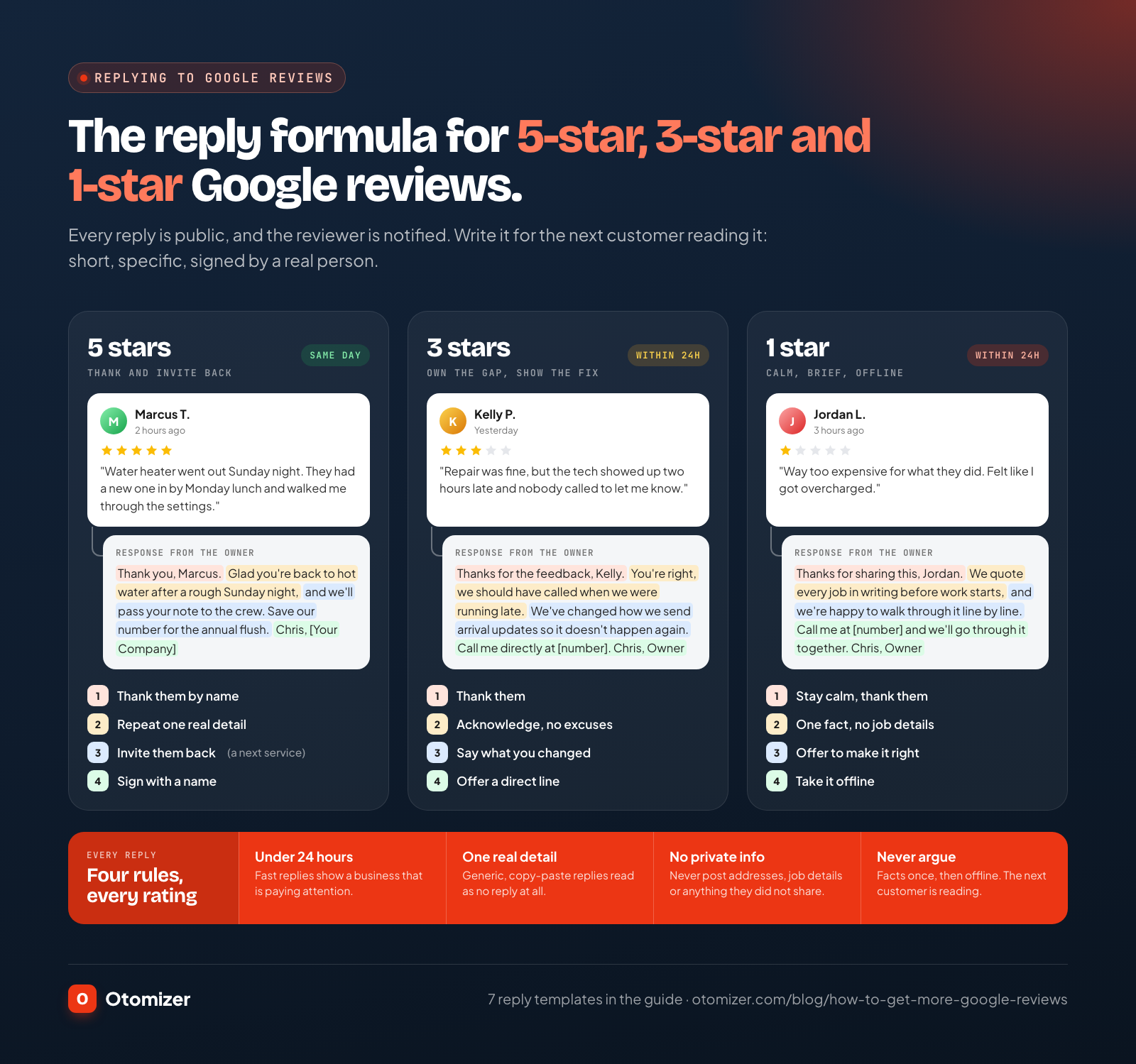
The reply formulas
- Five stars: thank them by name, mention one specific detail from their review, invite them back.
- Three or four stars: thank them, acknowledge the gap without excuses, say what you are changing, offer a direct line.
- One or two stars: stay calm, acknowledge the frustration, state the facts briefly without job details, take it offline with a name and number.
Keep every reply short, sign it with a name, and never include the customer’s address, job details, health information or anything they did not put in the review themselves.
Templates for positive reviews
1. Five stars, with details
“Thank you, [Customer]. We’re glad the new water heater has you back to hot showers, and we’ll pass your note along to [Tech]. Save our number for the annual flush. [Name], [Your Company]”
2. Five stars, no text
“Thanks for the five stars, [Customer]. We appreciate you choosing a local company. We’re here whenever you need us. [Name], [Your Company]”
3. Repeat customer
“[Customer], thank you for trusting us again this year. It’s always good to be back. See you at the next tune-up. [Name], [Your Company]“
Templates for mixed reviews
4. Three or four stars: good work, a miss on communication
“Thanks for the feedback, [Customer]. We’re glad the repair solved the problem, and you’re right that we should have called when the tech was running late. We’ve changed how we send arrival updates so it doesn’t happen again. If there’s anything else we can do, call me directly at [number]. [Name], Owner”
Templates for negative reviews
5. A real customer with a real complaint
“[Customer], I’m sorry the visit didn’t meet your expectations. That’s not the experience we want anyone to have. I’d like to understand what happened and make it right. Please call me directly at [number] or reply to the email we sent. [Name], Owner, [Your Company]”
6. A price complaint
“Thanks for sharing this, [Customer]. We quote every job in writing before work starts, and we’re happy to walk through the estimate line by line. If something wasn’t clear, that’s on us to explain better. Call me at [number] and we’ll go through it together. [Name], Owner”
7. A reviewer you cannot find in your records
“We take every review seriously, and we can’t find a job under this name in our records. If we worked with you under a different name or address, please call me at [number] so we can look into it. [Name], Owner, [Your Company]”
The seventh reply does two jobs. It tells the next customer, politely, that this may not be a real customer. And it gives you a clean record if you flag the review, which is the next section.
How do you remove false or unfair Google reviews?
Start by sorting the review into one of three buckets, because each gets different treatment.
| Review type | Example | What to do |
|---|---|---|
| Unfair but genuine | A real customer who exaggerates, or is upset about price | Reply calmly using templates 5 or 6. It stays up. |
| Policy violation | Never a customer, a competitor, a former employee, harassment, off-topic content, the wrong business | Reply with template 7, then flag it for removal |
| Review campaign | Several one-star reviews in a day from accounts with no history | Flag each one, document dates and screenshots, and contact Google Business Profile support |
Google only removes reviews that break its policies, not reviews you disagree with. The Maps user contributed content policy prohibits content that is not based on a genuine experience, content from people with a conflict of interest (such as current or former employees, industry competitors and family members), and harassment.
How to flag a review
Google’s help page on reporting inappropriate reviews gives two routes:
- From your Business Profile: select Read reviews, select the report icon next to the review, choose the reason that fits, then Send report.
- From the Reviews Management Tool: confirm your account, select your business, choose Report a new review for removal, select Report next to the review, choose a reason and Submit.
Google says evaluation typically takes several days. Check the status in the Reviews Management Tool: “Decision pending,” “Report reviewed - no policy violation,” or “Escalated - check your email for updates.”
How to appeal
If Google finds no violation and you still believe the review breaks policy, you get one appeal per review. In the Reviews Management Tool, choose the option to check the status of a previously reported review, select Appeal eligible reviews, pick the reviews (up to 10 at a time), and submit the form. Explain the specific policy the review violates and attach evidence: no matching job record, a reviewer who works for a competitor, a location you do not serve. Google emails you the final decision.
What never to do about a bad review
Do not threaten the reviewer with a lawsuit, pressure them to take it down, or offer a refund in exchange for deleting it. The FTC’s consumer review rule bans using unfounded legal threats, intimidation or certain false public accusations to prevent or remove a negative review, and Google prohibits offering anything in exchange for removing one. Fix the problem for the customer if it is real, and let them decide on their own whether to update the review.
Can you pay for Google reviews? What never to do
No. And paying is only one of several practices that get reviews removed, and in some cases put you in federal trouble.
The FTC’s final rule on consumer reviews and testimonials (16 CFR Part 465) took effect on October 21, 2024. It bans buying or creating reviews from people who did not have a real experience, offering incentives conditioned on a particular sentiment, undisclosed insider reviews, and review suppression. It lets the FTC seek civil penalties against knowing violators, and in December 2025 the FTC warned 10 companies that violations can cost up to $53,088 each. Google’s policy is stricter still on incentives: it prohibits any incentive in exchange for a review, regardless of sentiment. And the FTC’s guide for marketers on soliciting reviews says it plainly: do not ask for reviews only from customers you think will leave positive ones.
| Practice | What it looks like | Google policy | FTC rule | Do this instead |
|---|---|---|---|---|
| Review gating | ”Rate us 1 to 5” survey, only 4s and 5s get the Google link | Prohibited | FTC guidance: do not ask only likely fans | Same link to every customer |
| Incentives | Discount, gift card or raffle entry for a review | Prohibited | Prohibited when tied to sentiment | Ask, then thank them after |
| Buying reviews | Paying a service or anyone else for reviews | Prohibited | Prohibited | Run the 72-hour system |
| Review swaps | Trading reviews with another local business | Prohibited (conflict of interest) | Prohibited when the reviewer had no real experience | Trade referrals, not reviews |
| Insider reviews | Employees, family or the owner reviewing the business | Prohibited (conflict of interest) | Prohibited without disclosure | Ask real customers only |
| Staff review quotas | ”Each tech needs 10 reviews this month” | Prohibited | No specific provision | Measure asks per tech, not reviews |
| Scripted content | ”Please mention [Tech] and five stars” | Prohibited | No specific provision | Ask for “a review of your experience” |
| Suppression | Threatening a reviewer, offering a refund to delete | Prohibited | Prohibited | Reply publicly, fix it privately |
A note on thank-you gestures: you can absolutely thank customers. Send a handwritten card, call them, wave at the next service visit. Just never connect a reward to leaving a review, and never promise one in the request.
How many Google reviews do you need?
There is no number that guarantees a top-three spot, because Google weighs reviews alongside relevance, distance and everything else on your profile. But customers have clear thresholds. BrightLocal’s 2026 survey found 47% of consumers will not use a business with fewer than 20 reviews, and 74% seek reviews written in the last three months.
So set two targets:
- A floor: get past 20 reviews as fast as you can, using the past-customer template above on everyone you served in the last year.
- A pace: fresh reviews every week, every month, forever. Recency is what customers read and what keeps your profile looking alive.
Here is how to find your own pace. Say you close 40 jobs a month. If every customer gets the full sequence and one in four leaves a review, that is 10 new reviews a month and 120 a year. If you only remember to ask half your customers, it drops to 5 a month. The math is always the same: closed jobs, times ask rate, times review rate. The ask rate is the one you control completely.
The weekly Google review KPI tracker
Fifteen minutes every Monday keeps the system running. Pull last week’s closed jobs, compare them against asks sent and reviews received, and reply to anything still waiting.
| Metric | How to calculate | Target |
|---|---|---|
| Closed jobs | Jobs completed last week | Your baseline |
| Ask rate | Requests sent ÷ closed jobs | 100% |
| Review rate | New reviews ÷ requests sent | Up month over month |
| New reviews | Reviews posted last week | Steady every week, no gaps |
| Reviews, last 90 days | Count on your profile | Growing every quarter |
| Rating, last 90 days | Average of recent reviews | At or above your overall average |
| Response rate | Reviews replied to ÷ new reviews | 100% |
| Response time | Hours from review to reply | Under 24 business hours |
| Open flags | Reported reviews awaiting a decision | Every one checked weekly |
Track asks per tech, not reviews per tech. Google prohibits asking staff to solicit a certain number of reviews, and asks are the part each tech controls anyway. A tech with a low ask rate needs a reminder. A tech with a high ask rate and a low review rate may need a better handoff script, which template 1 fixes.
Two patterns to watch for: a drop in ask rate (someone stopped sending the texts) and a run of lower ratings on one service line (that is an operations signal, not a marketing one).
Who runs your review engine for you?
You can run everything above with a spreadsheet and some discipline. Most owners find the discipline is the hard part, because the review text is the first task that slips on a busy Friday.
Otomizer Local Presence runs it for you. Review requests go to every closed job, so no customer is skipped and no week goes quiet. Presence also includes a brand kit and 20 designed posts plus 4 short videos every month across your Facebook groups, Facebook Page, Instagram and Google Business Profile, seasonal campaigns, and a monthly performance call, on top of everything in Local Leads: our aged local accounts inside every Facebook group in your county, private ones included, monitored around the clock, with a recommendation naming your company usually inside 60 seconds. Presence is $1,497 a month plus a $1,797 setup.
Local Dominance turns those reviews into visibility. It adds a complete premium website rebuild, local SEO for your Google Business Profile, citations, service and city pages, AEO so ChatGPT, Google AI Overviews and Perplexity name you, and a monthly visibility report covering Google rankings and AI mentions. Dominance is $1,997 a month plus a $2,997 setup, with a six-month start.
Every plan is exclusive: one company per trade, per county. And every plan carries the same guarantee: 20 qualified conversations in your first 90 days, or we keep working at no charge until you get them. Compare all three on the pricing page, see how Otomizer Local works, or check the trade pages for roofing, HVAC and plumbing.
| Doing it yourself | Otomizer Local Presence | Otomizer Local Dominance | |
|---|---|---|---|
| Review request to every closed job | When someone remembers | Yes, every job | Yes, every job |
| Google Business Profile posts | When there is time | Included in 20 posts a month | Included, plus full profile optimization |
| Facebook group recommendations | Not covered | 24/7, county exclusive | 24/7, county exclusive |
| Website, local SEO and AEO | Separate vendors | Not included | Included, reported monthly |
| Your time each week | Hours | Minutes | Minutes |
The bottom line
Getting more Google reviews is not a trick. It is a habit, run on every job: ask in person, text the link within two hours, follow up once, keep the link everywhere, and reply to every review. Ask everyone, offer nothing in return, and never touch the practices Google and the FTC prohibit.
Do that every week and your profile stays fresh, your Maps visibility climbs, AI assistants have something real to say about you, and the next homeowner picks you before they ever see your price. Or hand the review engine to our team and get back to running jobs.

Stop racing for shared leads. Get recommended in your county.
Otomizer Local covers one trade in one county exclusively. Our team monitors neighborhood groups and posts a recommendation naming your company when homeowners ask who to hire.
Apply for Otomizer LocalOne company per trade per county · Three-month initial term
FAQ
Frequently asked questions
01How do I get more Google reviews fast?
02How do I get my Google review link?
03Is it legal to offer a discount for a Google review?
04What is review gating?
05How should a business respond to a negative Google review?
06Can you get a bad Google review removed?
07How many Google reviews does a local business need?
08Do Google reviews help with Google Maps ranking?
Keep reading
Related articles
How to Rank Higher on Google Maps: The Contractor Playbook
November 13, 2026
MarketingWhat Is AEO? How Local Businesses Get Named by ChatGPT and Google AI
November 1, 2026
MarketingHome Service Marketing: The 2026 Playbook for Plumbers, Electricians, and Local Trades
October 30, 2026
Otomizer LocalDone-For-You Marketing Pricing: Local Leads vs Presence vs Dominance
November 1, 2026