How to Rank Higher on Google Maps: The Contractor Playbook
How to rank higher on Google Maps: how the map pack works, a complete Google Business Profile checklist, reviews, website signals and a 30/60/90 day plan.

Key takeaways
- 01 Google ranks local results on three things: relevance, distance and prominence. You cannot move your office, so you win by being the most relevant and most prominent business in reach of the searcher.
- 02 Your primary Google Business Profile category is the single biggest lever you control. In the 2026 Whitespark survey of local SEO experts, it ranks as the top local pack factor.
- 03 Reviews are the second biggest group of signals. A steady flow of recent, detailed reviews with a reply to every one beats a big batch from two years ago.
- 04 Your website, citations and local links decide prominence. Service pages, city pages, matching business details everywhere and LocalBusiness schema turn a profile into a ranking.
- 05 Track rank with a geo-grid, not a single search from your desk. Local Dominance runs the profile, website, citations and AI search for you, one company per trade, per county.
The short answer: to rank higher on Google Maps, choose the most accurate primary category, complete every section of your Google Business Profile, earn a steady flow of recent reviews and reply to each one, then back it up with service and city pages, consistent business details across directories, and local links. Google ranks on relevance, distance and prominence.
This is the full playbook for a service business: how the local pack decides who shows up, a step-by-step Google Business Profile optimization checklist, the review, website, citation and link work that builds prominence, how to measure rank properly with a geo-grid, the suspensions that wipe out profiles overnight, and a 30/60/90 day plan with every task ranked by impact.
It is written for roofers, HVAC shops, plumbers, electricians, remodelers and every other trade that lives or dies by the phone ringing. If your business does not show up when a homeowner three miles away types “roofer near me,” this is where to start.
How does the Google Maps local pack work?
The local pack (also called the map pack or 3-pack) is the block of three business listings with a map that Google shows for searches with local intent, such as “plumber near me” or “roof repair Lakewood.” Tap “More places” and you reach the local finder, the full list behind those three. The Google Maps app runs on the same ranking systems.
Three facts shape everything else in this guide:
- There is no single rank. Google ranks you relative to where the searcher is standing. You can sit first for a homeowner two miles from your shop and fifteenth for one twelve miles out, for the same search, at the same minute.
- The top three take the calls. The pack is the first thing a homeowner sees, with call and directions buttons right there. Position four sits behind a tap most people never make.
- It is free, and it compounds. You do not pay per click or per call for an organic map listing. Every review, photo, page and link you add keeps working next year.
Google says it plainly in its help center: “There’s no way to request or pay for a better local ranking on Google.” Sponsored listings can appear above or inside the map, but they are labeled as ads and disappear when the budget does. The organic pack is earned.
What are the Google Maps ranking factors?
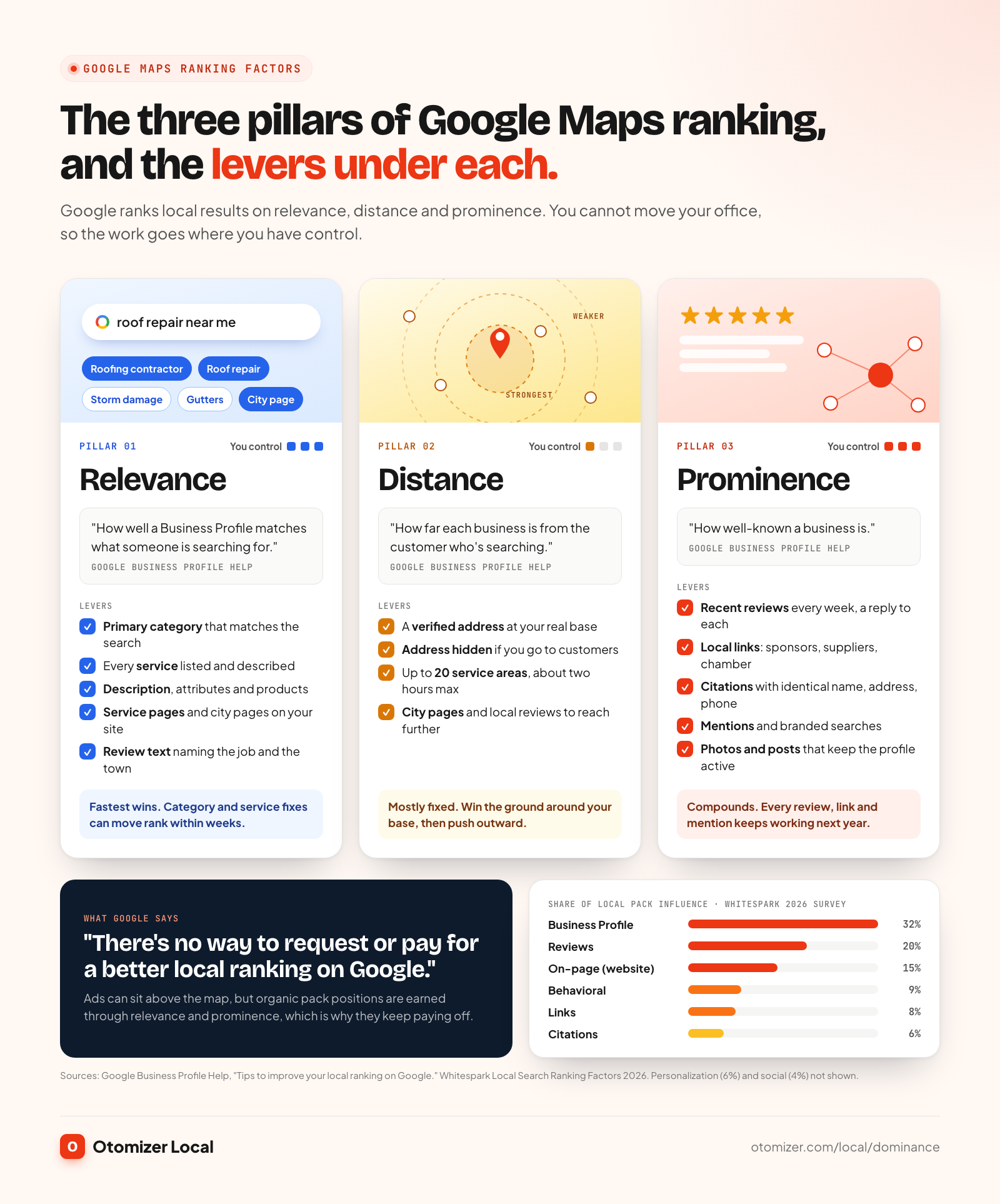
Google’s own guide to improving your local ranking names three factors. Here they are in Google’s words, with what each one means for a contractor:
- Relevance: “how well a Business Profile matches what someone is searching for.” Your categories, services, description, website content and review text tell Google what you do.
- Distance: “how far each business is from the customer who’s searching.” Your verified address is the anchor. You cannot change where the searcher is.
- Prominence: “how well-known a business is.” Google says this draws on information like how many websites link to your business and how many reviews you have, and that “more reviews and positive ratings can help your business’s local ranking.”
Distance is mostly fixed. Relevance and prominence are where you win.
How much does each signal matter?
Google does not publish weights. The most cited outside estimate is the Whitespark Local Search Ranking Factors survey, where leading local SEO practitioners score each factor. The 2026 edition, published in November 2025, splits local pack and Maps influence like this:
| Signal group | Share of local pack / Maps influence (Whitespark 2026) | What it covers |
|---|---|---|
| Google Business Profile signals | 32% | Categories, name, address, hours, completeness |
| Review signals | 20% | Count, rating, recency, keywords in review text |
| On-page signals | 15% | Your website: service pages, city pages, NAP, content |
| Behavioral signals | 9% | Clicks, calls, direction requests, dwell time |
| Link signals | 8% | Links to your website, especially local and relevant ones |
| Citation signals | 6% | Directory listings with matching details |
| Personalization | 6% | The searcher’s own history and location |
| Social signals | 4% | Social profiles and engagement |
The same survey ranks the top individual local pack factors as the primary GBP category, the distance from the searcher to the business, keywords in the business title, a physical address in the city of the search, and being open at the time of the search. Every one of those sits in this checklist, along with what to do when a factor (like your business name) is off limits.
Why is my business not showing on Google Maps?
Before you optimize, diagnose. Search your exact business name in Google Maps, then search your main service plus your town. Work down this list:
- You do not appear for your own name. The profile is unverified, suspended, or missing. Sign in to your Business Profile and look for a verification prompt or a suspension notice.
- You appear for your name but not for your service. Relevance or prominence is the problem. Your primary category is likely off, services are thin, or competitors simply have more reviews and links.
- You rank near your office but vanish a few miles out. That is distance. It is normal, and it is where city pages, reviews from those towns and local links extend your reach.
- You disappeared after an edit. A name, category or address change can trigger a re-review. Changes to core details sometimes pause a profile while Google checks them.
- A competitor at the same address or a duplicate listing. Google filters near-identical listings, so only one shows. Duplicates of your own business split your reviews and signals.
- The profile is brand new. New profiles start with no reviews, photos or history. Expect weeks, not days, of steady work before the map moves.
How to optimize your Google Business Profile, step by step
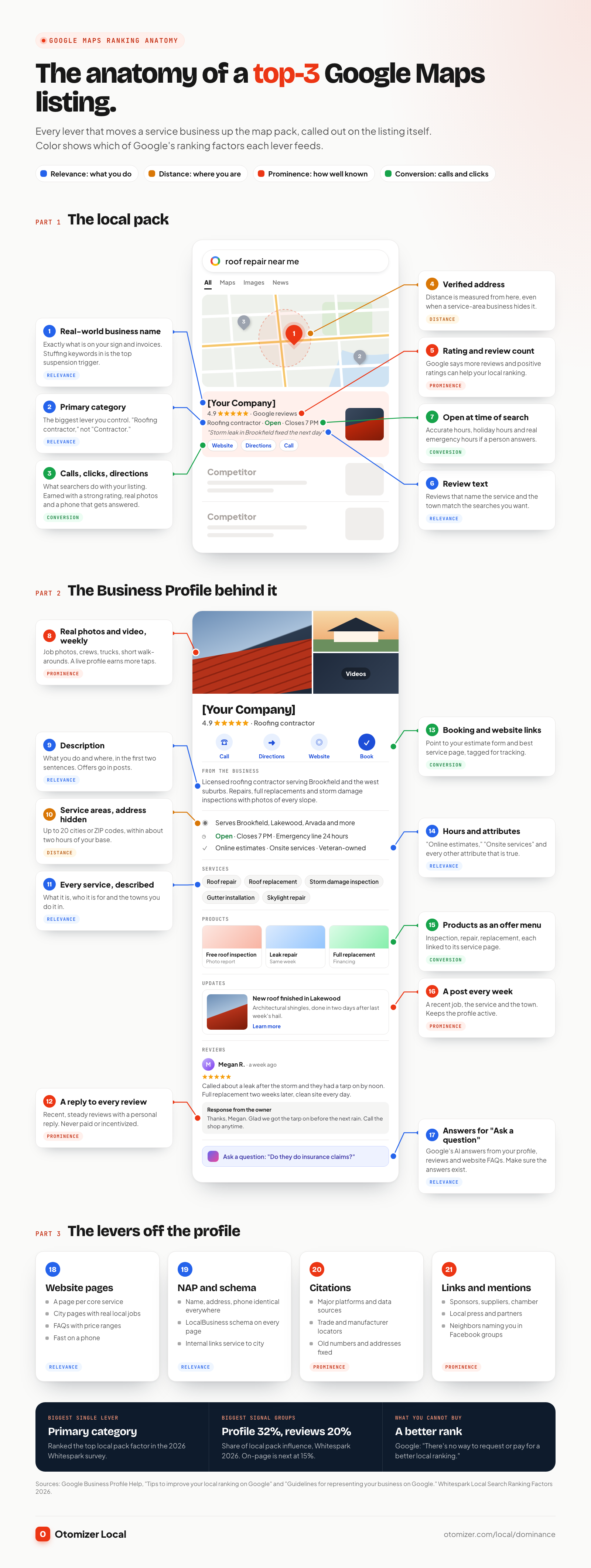
Google Business Profile signals are the largest group in the Whitespark survey, and Google says “businesses with complete and accurate info are more likely to show up in local search results.” This is the part you can fix this week.
1. Claim, verify and keep one profile
Verification “tells Google that you’re authorized to represent the business, so it’s more likely to show up in search results,” per Google. One business, one location, one profile. If you find duplicates, request removal of the extras so reviews and signals consolidate on the real one. Add your office manager as a manager on the profile instead of sharing your login.
2. Use your real business name, exactly
Google’s guidelines for representing your business say your name should reflect “your business’s real-world name, as used consistently on your storefront, website, stationery.” Marketing taglines, service or location details, phone numbers and all-caps words are not allowed, and Google warns that including unnecessary information “could result in the suspension of your Business Profile.”
So “[Your Company]” is correct. “[Your Company] Roofing Repair Best Roofer Denver” is the fastest way to lose the profile. Keywords in the name do correlate with rankings, which is exactly why the guideline is enforced. If your trade or town genuinely belongs in your name, the only legitimate route is a real rebrand: registration, signage, trucks, website and invoices.
3. Pick the right primary category
This is the single biggest lever you control. Google’s guidance: “Use as few categories as possible to describe your overall core business,” choose ones that are “as specific as possible,” and pick categories that complete the sentence “This business IS a,” not “this business HAS a.”
- Primary category: the one thing you most want to rank for. “Roofing contractor,” not “Contractor.” “HVAC contractor” or “Air conditioning contractor,” depending on which work you want more of.
- Secondary categories: add only the ones that describe what you are. A roofer that also does gutters as a real line of business can add “Gutter cleaning service.” Skip categories for one-off jobs.
- Check the leaders. Look at the businesses in the top three for your money search. Their primary category is a strong hint about what Google associates with that search.
4. List every service, with a description
Add every service you offer in the Services section, using Google’s suggested services first and custom ones after. Write a short description for each in plain language: what it is, who it is for, and the towns you do it in. “Storm damage roof inspection: free, photos of every slope, written report the same week” gives Google and the homeowner something concrete.
5. Set service areas and hide your address (service-area businesses)
If you travel to customers and do not receive them at your office, Google says “you should hide your business address from customers.” You can set up to 20 service areas by city or ZIP code, and Google asks that the overall area stay within about two hours of driving time from your base.
One thing that surprises owners: service areas describe where you work, but your verified address is still the point Google measures distance from. Adding a city 40 minutes away to your service areas does not make you rank there. City pages, reviews and links from that city are what extend your reach.
6. Keep hours accurate, and be open when people search
“Business is open at time of search” ranks in the Whitespark top five. Set regular hours, add holiday hours before every holiday, and use special hours for storm weeks. If you really do take emergency calls at night and a person answers, list those hours. If nobody answers, do not.
7. Write a description that states what you do and where
Use the first two sentences to say what you are, what you do most, and where. Then add proof: license, warranty, financing, years in business, response time. Google’s guidelines ask that the description cover your services and history and not focus on promotions, prices or sales, so save offers for posts. Write it like the answer to “who are you and why should I call?“
8. Add real photos and video every week
Google notes that photos and videos “show customers what you offer and tell the story of your business.” For a contractor that means:
- Your logo and a cover photo of a truck, crew or finished job
- Before and after shots of real jobs, tagged with the service and town in the caption you post with them
- Crew photos with branded shirts and trucks
- Short phone videos: a 20-second walk-around of a finished roof or a new condenser install
Add a few every week. A profile with fresh photos looks alive, and homeowners spend more time on it.
9. Use Products for your packaged offers
The Products section is not just for retailers. Contractors use it as a visual menu: “Free roof inspection,” “AC tune-up,” “Water heater replacement,” “Panel upgrade.” Each gets a photo, a short description, an optional price or “from” price, and a button linking to the matching service page on your website.
10. Publish a post every week
Posts keep your profile active and give searchers fresh proof. One a week is a strong rhythm: a recent job with a photo, a seasonal offer, a storm-season tip. Mention the service and the town naturally. Local Presence and Local Dominance clients get designed posts to their Google Business Profile every month as part of the plan.
11. Answer questions on your profile and on your website
Google has been retiring the old public Q&A section on Business Profiles, and in many Maps listings it now shows an AI “Ask a question” feature that answers from information Google already has about you. Whitespark’s breakdown of the change points to the profile itself, reviews and your website’s FAQ content as the likely sources. So the move is to make sure the answers exist: attributes and services filled in, a description that states your service area and financing, and an FAQ section on your website covering price ranges, timelines, warranties and emergency service.
12. Make calls, bookings and messages land
Google retired Business Profile chat in July 2024. What remains is the call button, the website link, directions and booking links, and those are where the ranking work turns into revenue.
- Call button: a local number that rings a person during business hours. Google asks for a number that “connects to your individual business location.” Missed calls are lost jobs.
- Website link: point it at your homepage or your strongest service page, and use a UTM tag so you can see Maps traffic in analytics.
- Booking or quote link: add an appointment link to your estimate form.
13. Fill in every attribute that applies
Attributes such as “Online estimates,” “Onsite services,” veteran-owned or women-owned, and accessibility details add relevance and help you match filtered searches. Fill in every one that is true.
How do reviews affect your Google Maps ranking?
Reviews are the second biggest group of local pack signals in the Whitespark survey, and the one Google calls out by name: “More reviews and positive ratings can help your business’s local ranking.” Google also says “Positive reviews and helpful replies can help your business stand out.”
Four things matter:
- Velocity: a steady flow of new reviews every month. Ten in a week and then silence for a year looks worse than two or three every week, to Google and to homeowners.
- Recency: in the BrightLocal Local Consumer Review Survey 2026, 74% of consumers only care about reviews written in the last three months, and 47% will not use a business with fewer than 20 reviews.
- Detail: reviews that mention the service and the town (“replaced our water heater in Brookfield the same day”) add relevance for the searches you want.
- Replies: the same BrightLocal survey found 89% of consumers expect owners to respond to reviews, and 81% expect a reply within a week. Reply to every review, good or bad, within a few days.
Ask for reviews the way Google allows
Google’s Maps user-contributed content policy lets you ask customers to review a genuine experience. It prohibits offering incentives “such as payment, discounts, free goods and/or services” for a review, selectively soliciting only positive reviews, and discouraging negative ones. Ask every customer, every time, the same way.
The ask that works: at job completion, the tech says “if you were happy with today, a Google review mentioning what we did helps other homeowners find us,” and a text with your review link arrives within the hour. Our step-by-step guide on how to get more Google reviews has the scripts, timing and follow-up sequence. On Local Presence and Local Dominance, review requests go out to every closed job automatically.
What website signals help you rank on Google Maps?
On-page signals are 15% of local pack influence in the Whitespark survey and the largest group for local organic results. Your website is how Google confirms what your profile claims.
Service pages
One page per core service: roof replacement, roof repair, storm damage, gutters. Each page answers what the service is, what it costs (a range), how long it takes, what is included, and the towns you do it in. Put the service name in the page title and H1. Link your profile’s website button or products to these pages.
City pages
One page per main town in your service area, built on real local substance: the neighborhoods you work in, common local housing stock, permit notes, photos of jobs in that town, and reviews from customers there. A page that only swaps the town name in a template is thin, and Google treats it that way. Our guide to what a contractor website should cost covers what a site built around service and city pages includes.
NAP consistency
NAP is your name, address and phone number. It must match your Business Profile exactly on your website footer, contact page, and every directory. “Suite 200” versus “Ste 200” is fine. A different phone number or an old address is not.
LocalBusiness schema
LocalBusiness schema is structured data in your page code that tells search engines your business type, name, address or service area, phone, hours and reviews in a format machines read directly. Google documents it in its local business structured data guide. Use the most specific type (such as RoofingContractor or HVACBusiness), and make it match your profile.
Internal links and speed
Link your homepage to every service page, every service page to the city pages where you do that work, and every city page back to the relevant services. Keep the site fast on a phone, where most local searches happen. Run your homepage through Google Lighthouse and aim for 90+ on mobile performance and SEO.
Do citations still matter for Google Maps?
A citation is any listing of your business name, address and phone on another site: directories, data aggregators, industry sites and local business listings. Citation signals are 6% of local pack influence in the Whitespark survey. That is smaller than reviews, but inconsistent citations still drag you down by confusing Google about which details are true.
Get these right first:
- The major platforms: Apple Business Connect, Bing Places, your Facebook Page, the Better Business Bureau and your chamber of commerce
- Trade and manufacturer directories: shingle and equipment manufacturer contractor locators, trade associations, licensing board lookups
- Local sites: city and county business directories, local news business listings, community sites
The rule is consistency, not volume. Twenty accurate citations beat two hundred messy ones. Audit for old phone numbers and old addresses, and fix those first.
How do local links and mentions build prominence?
Google says prominence draws on “how many websites link to your business.” For a contractor, the best links are local and real:
- Sponsorships: youth sports teams, school fundraisers, charity events. Most list sponsors with a link.
- Suppliers and manufacturers: certified contractor programs usually include a locator listing with a link.
- Associations: chamber of commerce, home builders association, trade groups.
- Local press: a storm response story, a community project, a new hire announcement in the local paper.
- Partners: realtors, property managers, inspectors and insurance agents who list trusted contractors.
Mentions count even without links. When neighbors recommend you by name in local Facebook groups, people search your name next, and branded searches tell Google your business is well known. That is the engine every Otomizer Local tier runs.
What are behavioral signals on Google Maps?
Behavioral signals are what searchers do with your listing: clicking through to your website, tapping to call, requesting directions, looking at photos, searching your name directly. They are 9% of local pack influence in the Whitespark survey.
You do not game these. You earn them by being the listing a homeowner wants to tap: a strong rating, recent reviews, real photos, hours that show “Open,” and a business name people already know. Your Business Profile performance report shows calls, website clicks and direction requests each month. Watch the trend, and connect it to your own numbers: if Maps sends five more calls a week and you book 40% of them at a $1,200 average ticket, that is $2,400 a week of new work from the same profile.
How to track your Google Maps rank with a geo-grid
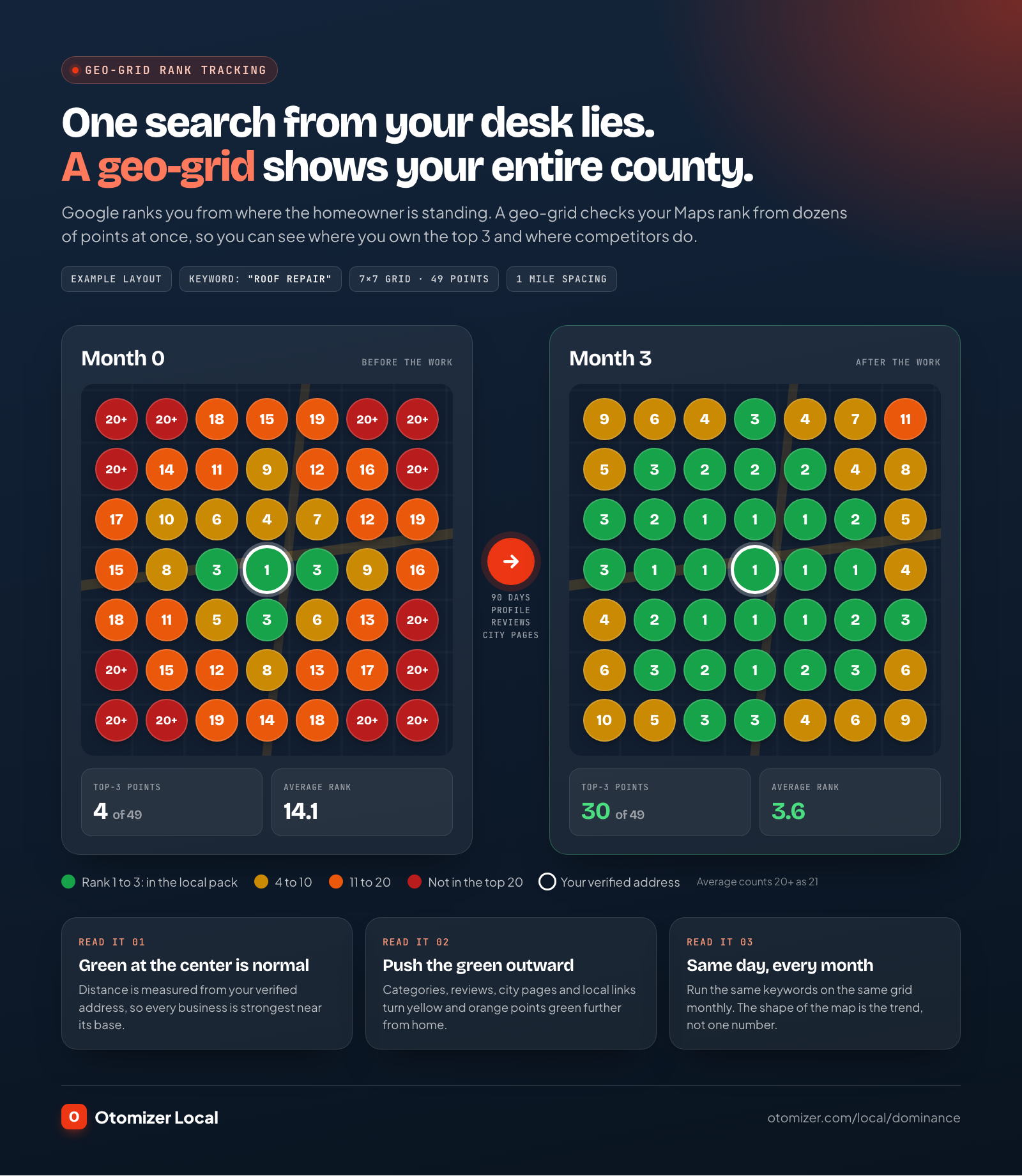
A geo-grid is a rank map: a grid of points laid over your service area, with your Maps rank for one keyword checked from each point. Because Google ranks relative to the searcher, a geo-grid is the only reliable way to see what homeowners across your county see. One search from your office tells you almost nothing.
How to run it:
- Pick five to ten money keywords. “Roof repair,” “roof replacement,” “roofer near me,” “storm damage roof repair.” Use the words homeowners type, not industry terms.
- Set the grid to your service area. A 7×7 or 9×9 grid with points one to two miles apart covers most service-area businesses.
- Track monthly, on the same day. Rankings move day to day. Monthly snapshots show the real trend.
- Read the shape, not one number. Green near your base and red at the edges is normal. The goal is pushing the green outward and turning yellow cells green.
- Compare against the top three competitors. Their grids show where they are strong and where you can take ground.
Local Dominance clients get this view in their monthly visibility report: where you rank on Google and Maps for your money searches, plus whether ChatGPT, Google AI and Perplexity name you.
Common Google Business Profile suspensions and how to avoid them
A suspended profile drops off the map completely. Google says it “may suspend or disable Business Profiles that don’t follow our guidelines.” These are the usual triggers for service businesses:
| Trigger | Why it gets flagged | How to avoid it |
|---|---|---|
| Keywords added to the business name | Breaks the real-world name rule | Use your exact registered and signed name |
| Showing a home address as a storefront | Service-area businesses should hide the address | Clear the address and set service areas |
| Virtual office or mailbox address | Google says a virtual office “isn’t eligible” | Use a real, staffed location or your home base, hidden |
| Multiple profiles for one business | One location gets one profile | Remove duplicates, keep one verified profile |
| Big edits all at once | Name, address and category changes can trigger a re-review | Change one core detail at a time, with proof ready |
| Paid or incentivized reviews | Prohibited under the Maps content policy | Ask every customer the same way, no rewards |
| A service area far beyond your base | Google asks for about two hours of driving time | Keep areas realistic, use city pages to reach further |
If you do get suspended, Google’s suspension and appeal guide is clear on two points: do not create a new profile for the same business, and appeals can only be submitted once. Fix the issue first, gather proof (business registration, license, a utility bill with the matching name and address), then appeal through the official tool.
How do Google Maps rankings tie into AI answers?
Homeowners now ask ChatGPT, Perplexity, Gemini and Google AI Overviews who to hire, and those assistants name two or three businesses. The evidence they lean on overlaps heavily with Maps: your profile, your website, your reviews, your citations and your mentions.
The Whitespark 2026 survey added AI search visibility as its own column for the first time. On-page signals lead there (24%), followed by reviews (16%), then citations and links (13% each), with GBP signals at 12%. So the same work that wins the map (clear service and city pages, consistent details everywhere, recent detailed reviews) also gets you named in AI answers. Our guide on what AEO is and how local businesses get recommended by AI covers the AI side step by step.
Your Google Maps ranking checklist, prioritized
Every task in this guide, ranked by what to do first. Impact reflects the Whitespark signal groups and Google’s own guidance. Time to effect is a typical range for a service-area business.
| Task | Impact | Effort | Time to effect |
|---|---|---|---|
| Set the most accurate primary category | Very high | Low | 1 to 3 weeks |
| Remove keywords from the name, fix guideline issues | Very high (protects the profile) | Low | Immediate |
| Complete services, description, attributes, hours | High | Low | 2 to 4 weeks |
| Review requests to every closed job, reply to every review | Very high | Medium | 1 to 3 months, then compounding |
| Service pages for each core service | High | Medium | 1 to 3 months |
| Fix NAP on website and top citations | Medium | Medium | 1 to 2 months |
| LocalBusiness schema on every page | Medium | Low | 1 to 2 months |
| Weekly photos and posts | Medium | Low | Ongoing |
| City pages for main towns | High for reach | High | 2 to 4 months |
| Local links: sponsors, suppliers, associations | Medium to high | High | 3 to 6 months |
| Geo-grid tracking for money keywords | Measurement | Low | Immediate |
| Products and booking links | Medium for conversion | Low | 2 to 4 weeks |
Your 30/60/90 day Google Maps ranking plan
Days 1 to 30: fix the profile
- Search your name and services from a geo-grid to set your baseline.
- Verify the profile, remove duplicates, and correct the name to your real-world name.
- Set the primary category and trim secondary categories to what you really are.
- Fill in every service with a description, hide your address if you are service-area, and set up to 20 service areas.
- Correct hours, add holiday hours, complete attributes and the description.
- Upload your best 20 job photos and start a weekly post.
- Start review requests on every closed job and reply to every existing review.
Days 31 to 60: build the website signals
- Publish or rebuild a page for every core service.
- Add LocalBusiness schema and match NAP sitewide.
- Fix your top citations and remove old phone numbers and addresses.
- Add Products for your main offers, linked to the matching service pages.
- Write FAQ sections on service pages with price ranges and timelines.
Days 61 to 90: extend your reach
- Publish city pages for your main towns, with real job photos and local reviews.
- Land five local links: a sponsorship, a supplier locator, the chamber, an association, a partner.
- Run your second and third geo-grids and compare against month one.
- Check AI answers: ask ChatGPT and Perplexity “who’s the best [your trade] near [your town]?” and note who gets named.
- Double down on the areas where the grid turned yellow, and keep reviews and posts on a weekly rhythm.
Local Dominance: own Google Maps and AI answers, done for you
Every step above works. It also adds up to a part-time job, on top of running crews, and it never ends. That is why Local Dominance exists.
Local Dominance is the top tier of Otomizer Local, our done-for-you growth team for local businesses. It runs everything in this guide for you, every month:
- Google Business Profile management: categories, services, service areas, products, photos and weekly posts
- A complete premium website rebuild with a page for every service and every city you serve, live within 30 days of kickoff, and yours to keep
- Local SEO: citations cleaned up and built out, schema on every page, internal linking, fresh search-ready content every month
- AEO so ChatGPT, Google AI Overviews and Perplexity name you
- Review requests to every closed job, plus 20 designed posts and 4 short videos a month across groups, Facebook, Instagram and your Google Business Profile
- Facebook group recommendations: our aged local accounts recommend you in every county group, private ones included, usually inside 60 seconds
- A monthly visibility report with your Google and Maps rankings plus AI mentions
Local Dominance is $1,997 a month plus a $2,997 setup, with a six-month initial term. It is one company per trade, per county, so the work never points at a competitor in your market. Every plan carries our guarantee: 20 qualified conversations in your first 90 days, or we keep working at no charge until you get them.
The website side of that work is a full Local Dominance rebuild: fast on mobile, a page for every service and city, and structured data on every page. Compare the tiers on the pricing page or in our breakdown of done-for-you marketing pricing, then claim your county before a competitor does.
For the bigger picture of how Maps fits with referrals, groups and the rest of your channel mix, see the home service marketing guide. Roofers can go deeper with how to get roofing leads, and HVAC shops with how to get HVAC leads.
The bottom line
Google Maps rewards the business that is most relevant and most prominent within reach of the searcher. You cannot move your office. You can pick the right category, complete every section of your profile, earn recent reviews every week, build service and city pages, keep your details identical everywhere, and earn local links. Then measure it on a geo-grid instead of guessing from your phone.
Do it yourself with the checklist above, or have Local Dominance run all of it, plus your website and AI search, while you run your crews.

Stop racing for shared leads. Get recommended in your county.
Otomizer Local covers one trade in one county exclusively. Our team monitors neighborhood groups and posts a recommendation naming your company when homeowners ask who to hire.
Apply for Otomizer LocalOne company per trade per county · Three-month initial term
FAQ
Frequently asked questions
01How do I rank higher on Google Maps?
02How long does it take to rank on Google Maps?
03Why is my business not showing on Google Maps?
04Does adding keywords to my business name help on Google Maps?
05Can a service-area business rank on Google Maps without a storefront?
06Do Google Business Profile posts help ranking?
07Can I pay Google to rank higher on Google Maps?
08Does Google Maps ranking affect ChatGPT and AI answers?
Keep reading
Related articles
How to Get More Google Reviews: 22 Templates and a 72-Hour System
November 13, 2026
MarketingWhat Is AEO? How Local Businesses Get Named by ChatGPT and Google AI
November 1, 2026
ContractorsContractor Website Cost in 2027: What a Premium Site Includes
November 1, 2026
MarketingHome Service Marketing: The 2026 Playbook for Plumbers, Electricians, and Local Trades
October 30, 2026